User Audit
Global Admin functions
These functions are available only to Global Admin users. If you are not a Global Admin, you can skip this section.
Use User Audit to review system activity and diagnose communication between SOC Manager® and the iLOQ API.
The User Audit Log records API requests and responses, including the user associated with the activity, the date and time, the page involved, and the type of event.
This function is primarily intended for troubleshooting and technical diagnostics.
Administrative Function
Under normal circumstances, you should not need to access or use the User Audit function.
If you are experiencing an issue with SOC Manager, please consult your administrator or the Midwest Security Products Technical Support department for assistance.
Open User Audit
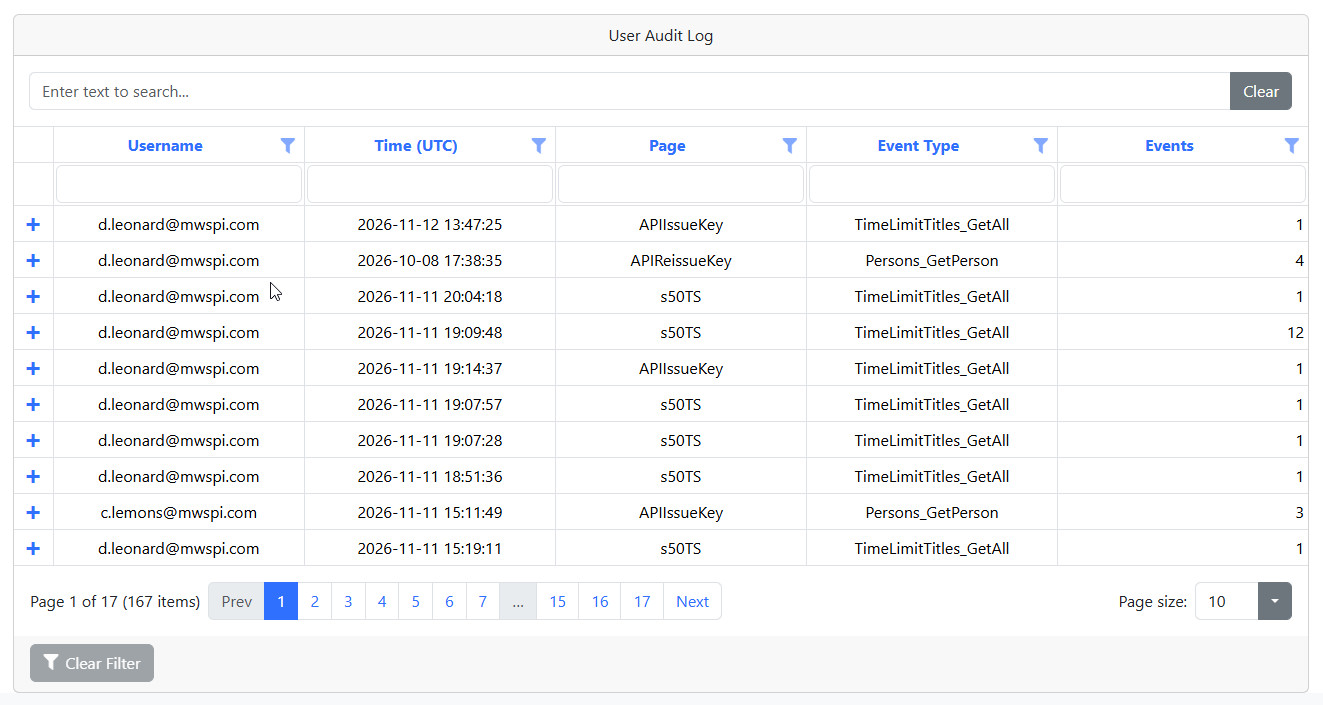
From the Global Administration menu, select User Audit. The User Audit Log screen opens.
View the User Audit Log
The User Audit Log displays recorded system activity in a searchable table.
The following information is available:
| Column | Description |
|---|---|
| Username | The user associated with the recorded activity. |
| Time (UTC) | The date and time of the event, displayed in Coordinated Universal Time (UTC). |
| Page | The SOC Manager page or function associated with the event. |
| Event Type | The API operation or system event that was recorded. |
| Events | The number of individual events associated with the log entry. |
Use the search field at the top of the screen to locate specific records.
Additional filtering options are available within the column headings.
The paging controls at the bottom of the screen allow you to navigate through the log entries and change the number of records displayed per page.
View Event Details
Each log entry can be expanded to display additional diagnostic information.
- Locate the desired entry in the User Audit Log.
- Select the + icon to expand the entry.
- Review the individual events associated with the entry.
- Expand an individual event to view its detailed diagnostic information.
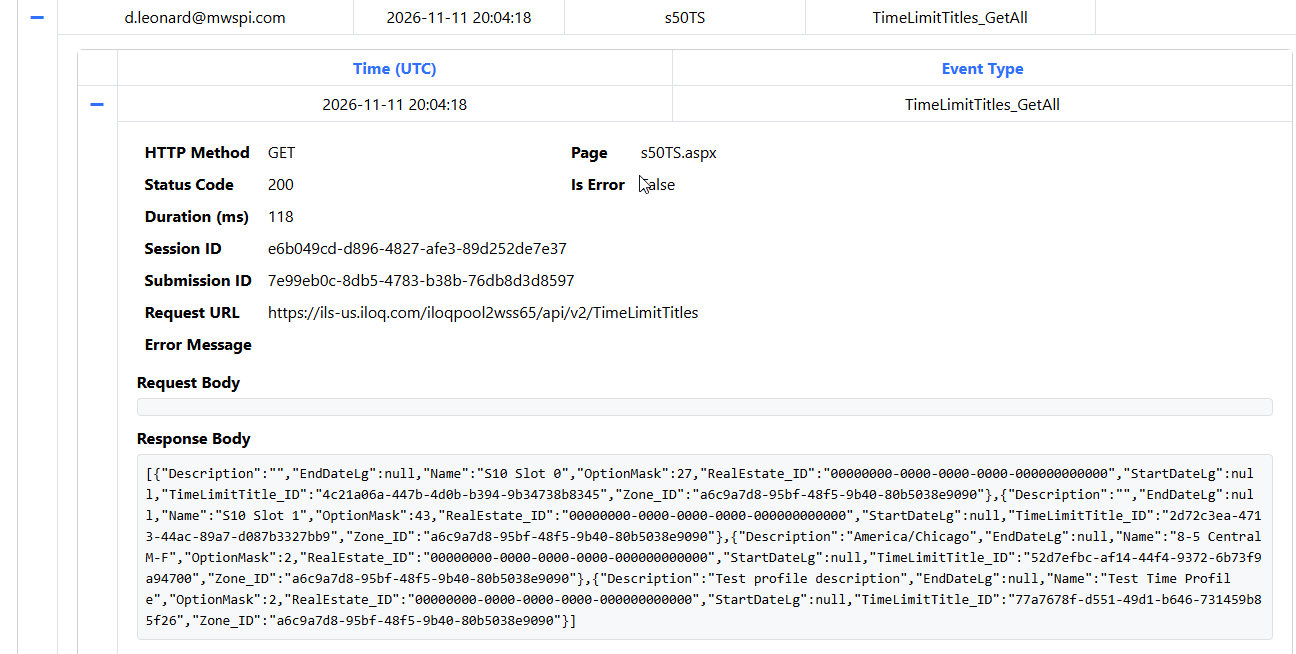
Depending on the event, the following information may be available:
| Field | Description |
|---|---|
| HTTP Method | The HTTP request method used, such as GET or POST. |
| Page | The SOC Manager page associated with the request. |
| Status Code | The HTTP response status code returned by the API. |
| Is Error | Indicates whether the event was recorded as an error. |
| Duration (ms) | The time required to complete the request, in milliseconds. |
| Session ID | An identifier associated with the user session. |
| Submission ID | An identifier associated with the request or submission. |
| Request URL | The API endpoint associated with the request. |
| Error Message | Error information, when available. |
| Request Body | Data submitted as part of the API request, when applicable. |
| Response Body | Data returned by the API, when available. |
Using User Audit for Diagnostics
User Audit is primarily used to investigate issues involving communication between SOC Manager and the iLOQ API.
Examples include:
- Reviewing API operations associated with phone key issuance.
- Investigating unsuccessful API requests.
- Examining API response codes and error messages.
- Reviewing the data returned by an API operation.
- Identifying unusually long API response times.
Time Display
Audit event timestamps are displayed in UTC, not the user's local time zone.
Technical Support
User Audit may contain detailed technical information, including API request and response data.
This information is intended for authorized administrators and technical support personnel.
If assistance is required, please contact your administrator or the Midwest Security Products Technical Support department.