Submit a Service / Support Request
Overview
Use Service / Support to submit a service or support request to Midwest Security Products directly from SOC Manager®.
Service / Support can be used to report a lock or key issue, request parts, or submit a general support question.
Feature Availability
The Service / Support feature may not be available to all organizations.
If you do not see Service / Support in SOC Manager, contact your SOC Manager administrator or Midwest Security Products for assistance.
1. Open Service / Support
From the SOC Manager Home page, select Service / Support.
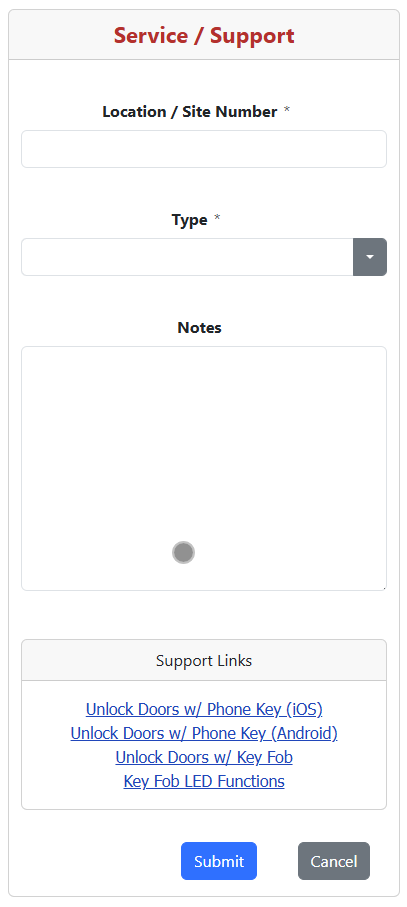
The Service / Support form is displayed.
2. Enter the Location / Site Number
Enter the Location / Site Number associated with the request.
Provide enough information to identify the location where service or assistance is needed.
Required Field
Location / Site Number is required before the support request can be submitted.
3. Select the Request Type
Select the Type that best describes your request.
Available request types are:
- Lock Issue - Report a problem with a lock.
- Key Issue - Report a problem with a Phone Key or Key Fob.
- Parts Requested - Request replacement or additional parts.
- General Question - Submit a general question or request for assistance.
- Other (See Notes) - Submit a request that does not fit one of the other categories.
Choose the Closest Request Type
Selecting the appropriate request type helps Midwest Security Products understand and respond to your request.
4. Enter Notes
Use the Notes field to provide details about the request.
When reporting a problem, provide as much useful information as possible, such as:
- A description of the problem.
- When the problem started.
- Any error messages or unusual behavior.
- Troubleshooting steps already attempted.
- Any other information that may help identify or resolve the problem.
Provide Specific Details
Providing complete and specific information can help the support team evaluate the request more quickly.
5. Submit the Request
Review the information entered on the form and select Submit.
Select Cancel to return without submitting the request.
What Happens Next
The Service / Support request is submitted to Midwest Security Products for review.
A member of the support team will review the information provided and follow up as appropriate.
Related Topics
- Lock Audit Trail
- Key Audit Trail