Revoke a Phone Key
Overview
Revoking a Phone Key removes the Phone Key from the Person and deactivates the credential in the iLOQ locking system.
Use this function when a Person no longer requires the Phone Key, such as when:
- Access is no longer required.
- An employee or contractor leaves the organization.
- A temporary access assignment has ended.
- A new Phone Key needs to be issued with different Access Rights.
Revoke or Blacklist?
Revoke a Phone Key when access is being intentionally removed, such as when an employee or contractor no longer requires access.
Blacklist a key when the credential is lost, stolen, or may be in the possession of an unauthorized person.
If the credential cannot be recovered and there is a security concern, use the Blacklist function rather than relying only on normal revocation.
Before You Begin
Before revoking a Phone Key:
- Confirm that you have selected the correct Person and Phone Key.
- The recipient's phone must have an Internet connection for the revocation to be received by the iLOQ S50 app.
1. Open Revoke Phone Key
From the SOC Manager® Home page, select Revoke Phone Key.
Once selected, the following form is displayed.
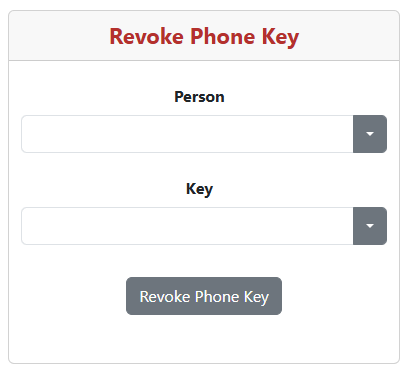
2. Select the Person
Select the Person who's Key wil be revoked.
Once a Person is selected, a list of all keys issued the them is displayed.
3. Select the Phone Key
Select the appropriate Key to be revoked.
Verify the Phone Key
Verify that you have selected the correct Person and Phone Key before continuing.
3. Revoke the Phone Key
Select Revoke Phone Key.
SOC Manager will ask you to confirm the operation.
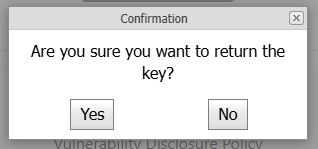
Select Yes to continue or No to return without revoking the Phone Key.
4. Confirm the Revocation
After the request has been successfully submitted, SOC Manager displays a confirmation message.
The removal and deactivation request is sent to the iLOQ cloud and normally takes approximately 2 to 5 minutes to complete.
Phone Must Be Online
The phone must be connected to the Internet to receive the updated credential information.
What Happens Next
After the revocation has been processed, the Phone Key is no longer assigned to the Person and can no longer be used as an active credential for the locking system.
If the Person requires access again in the future, a new Phone Key can be issued through SOC Manager.
Related Topics
- Issue a Phone Key
- Registering and Activating a Phone Key
- Blocklist a Key