Add a Person
Overview
Use Add Person to create a new Person in SOC Manager®.
A Person represents an individual who can receive an iLOQ credential, such as a Phone Key or Key Fob.
When a Person is created, they are assigned to a Site. A Person can also be associated with additional Sites when they work at or require access to multiple locations.
Site assignments determine where the Person appears when performing functions such as issuing a Phone Key or Key Fob.
Person or User?
A Person receives access credentials.
A User logs in to SOC Manager and manages access.
For more information, see Understanding Persons and Users.
Before You Begin
Before adding a Person:
- Confirm that the Person does not already exist in SOC Manager.
- Determine the Site where the Person should initially be assigned.
- Have the Person's contact information available if they will receive a Phone Key.
1. Open Add Person
From the SOC Manager Home page, select Add Person.
The Add Person form is displayed.
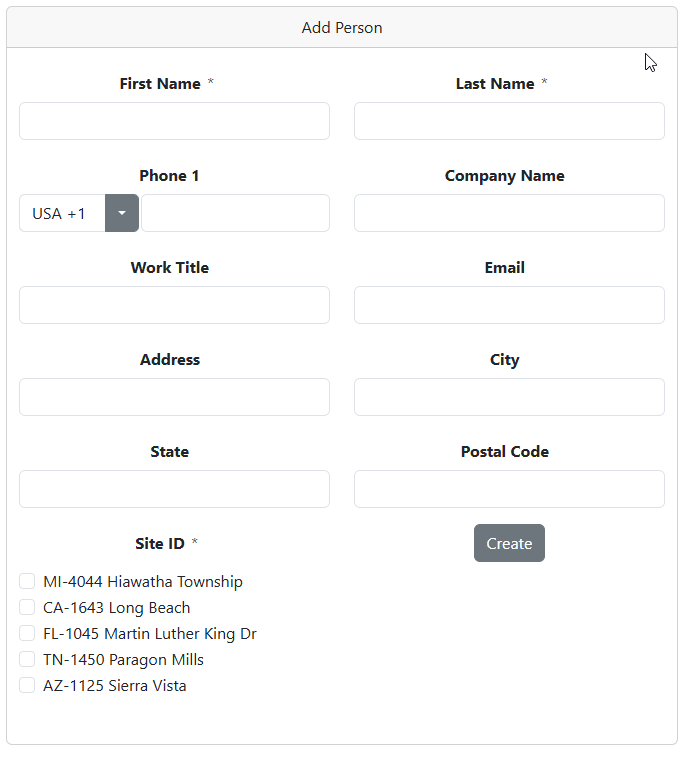
2. Enter the Person Information
Enter the information for the new Person.
Complete the required fields and any optional contact information appropriate for your organization.
Phone Key Contact Information
The Person's Phone number or Email address can be used when issuing a Phone Key.
Phone number must not contact dashes, spaces, etc. Just numeric values.
If a Phone number is available, SOC Manager sends the registration and activation information by SMS.
If only an Email address is available, the information is sent by email.
3. Assign the Person to a Site
Select the Site where the Person should initially be assigned.
The Site assignment determines where the Person appears within SOC Manager.
When issuing a Phone Key or Key Fob, selecting a Site filters the list of Persons to those associated with that Site.
Why Sites Are Important
Sites help organize Persons within SOC Manager.
Instead of searching through a large organization-wide list of Persons, selecting a Site displays the Persons associated with that location.
Site Access
You can only assign a Person to Sites that your SOC Manager User account is permitted to access.
4. Add the Person
Verify the Person information and Site assignment, then select Create.
SOC Manager creates the Person and adds them to the locking system.
What Happens Next
After the Person has been created, the Person is available for credential management functions such as:
- Issue a Phone Key
- Issue a Key Fob
- Revoke credentials
- Review key-related information
The Person will appear under each Site associated with that Person.
Related Topics
- Understanding Persons and Users
- Issue a Phone Key
- Issue a Key Fob
- Revoke a Phone Key
- Revoke a Key Fob