Lock Audit Trail
Overview
Use Lock Audit to retrieve audit information for locks at a selected Site.
The Lock Audit report provides a history of lock activity for the selected Site and date range.
SOC Manager® generates the audit report and sends the results to you by email as a CSV file. The CSV file can be opened using Microsoft Excel or another application that supports CSV files.
Before You Begin
Before requesting a Lock Audit:
- Identify the Site containing the locks you want to audit.
- Determine the date range you want to review.
- Verify that your SOC Manager User account has access to the appropriate Site.
Site Access
You can only request audit information for Sites assigned to your SOC Manager User account.
1. Open Lock Audit
From the SOC Manager Home page, select Lock Audit.
The Lock Audit form is displayed.
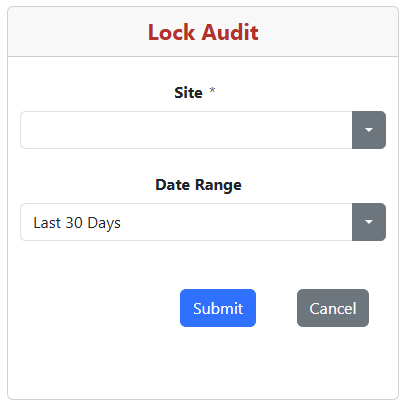
2. Select the Site
Select the Site containing the locks you want to audit.
The Site determines which locks are included in the audit request.
3. Select the Date Range
Select the appropriate Date Range for the audit report.
For example, select Last 30 Days to retrieve available audit records from the previous 30 days.
2,000 Record Limit
A maximum of 2,000 audit records can be retrieved in a single report.
If the selected date range contains more than 2,000 records, select a shorter date range and run additional reports as needed.
4. Submit the Request
Verify the selected Site and Date Range, then select Submit.
SOC Manager retrieves the available lock audit information for the selected Site and date range and prepares the report.
Select Cancel to return without requesting the report.
5. Check Your Email
The Lock Audit report is sent to you by email as a CSV file.
Open the attached CSV file using Microsoft Excel or another application that supports CSV files.
What Happens Next
The CSV file contains the available lock audit information for the selected Site and date range.
You can use Microsoft Excel to:
- Sort the audit records.
- Filter the results.
- Search for specific locks or events.
- Save the report for future reference.
Report Size
If you need to review more than 2,000 audit records, run multiple reports using shorter date ranges.
Related Topics
- Key Audit Trail