Edit a Person
Overview
Use Edit Person to update the contact and descriptive information for an existing Person in SOC Manager®.
A Person represents an individual who can receive an iLOQ credential, such as a Phone Key or Key Fob.
Editing a Person updates the Person's record. It does not change the Person's credential or access assignments.
Person or User?
A Person receives access credentials.
A User logs in to SOC Manager and manages access.
For more information, see Understanding Persons and Users.
Before You Begin
Before editing a Person:
- Confirm the Site where the Person is assigned.
- Have the updated contact or descriptive information available.
- Verify that you selected the correct Person before making changes.
1. Open Edit Person
From the SOC Manager Home page, open the menu and select Maintenance, then select Edit Person.
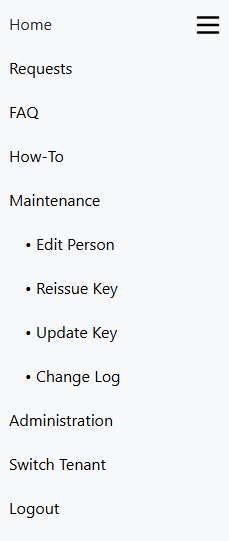
The Select Person window is displayed.
2. Select the Person
Select the Site ID where the Person is assigned, then select the Person.
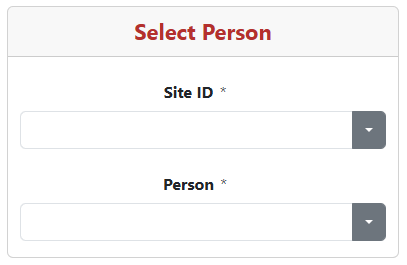
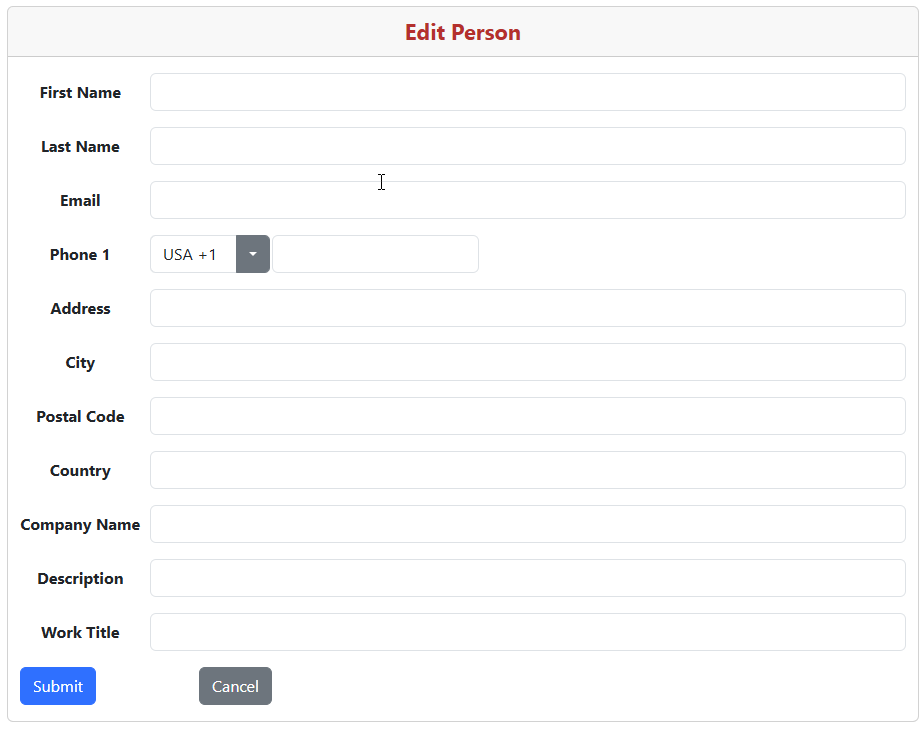
The Edit Person form is displayed.
3. Update the Person Information
Update the Person information as needed.
Available fields include:
- First Name
- Last Name
- Phone 1
- Address
- City
- Postal Code
- Country
- Company Name
- Description
- Work Title
Phone Key Contact Information
The Person's Phone number or Email address can be used when issuing a Phone Key.
Phone numbers must contain numeric values only. Do not include dashes, spaces, or other characters.
If a Phone number is available, SOC Manager sends the registration and activation information by SMS.
If only an Email address is available, the information is sent by email.
4. Save the Changes
Verify the updated Person information, then select Submit.
SOC Manager saves the changes to the Person's record.
To leave the form without submitting the changes, select Cancel.
What Happens Next
The updated information is available anywhere the Person appears in SOC Manager.
The Person remains available for credential management functions such as:
- Issue a Phone Key
- Issue a Key Fob
- Revoke credentials
- Review key-related information
The Person's existing Site, credential, and access assignments are not changed by editing the Person information.
Related Topics
- Add a Person
- Understanding Persons and Users
- Issue a Phone Key
- Issue a Key Fob
- Revoke a Phone Key
- Revoke a Key Fob